








Virtual Serial Port Driver Mobile

Virtual Serial Port Driver for
Windows CE/Mobile Platforms

Related Products
Case Studies

Client: Pavel Skribtsov

"Virtual Serial Port Driver saved us a lot of time and money we would spend for the hardware null-modem cable."

read full review
Build Info
File size:
5.01Mb
Latest build:
4.2
Release date:
29th August, 2007
Build compiled:
30th August, 2007
User Manual Changelog (RSS)
Want to upgrade? I have ver UPGRADE NOW
windows mobile software - windows mobile serial ports

Create up to 20 virtual serial ports

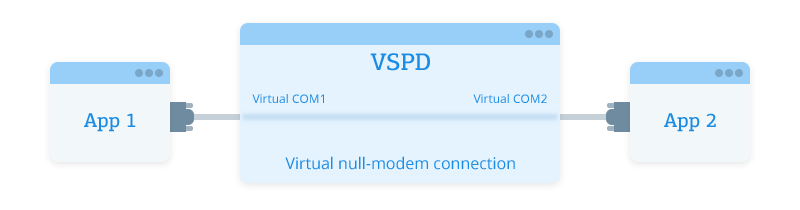
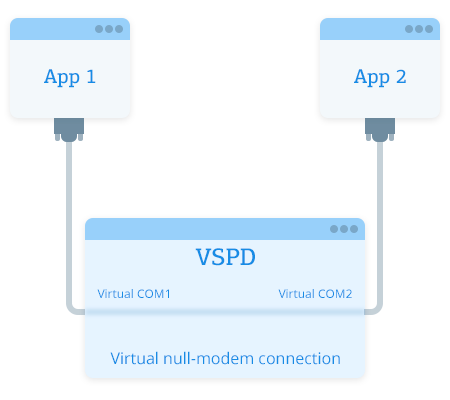
VSPD Mobile is a handy utility for mobile systems that can create pairs of virtual serial ports. Thus, you can use a pair of virtual serial ports to connect two applications, so that they can exchange data (for example, in GPS emulation).

Virtual Serial Port Driver Mobile fully supports ARM, MIPS, SH3/4, x86 and other processors.

mobile spftware

With Virtual Serial Port Driver Mobile you can:

Create up to 20 virtual serial ports

Virtual Serial Port Driver Mobile lets you easily create virtual ports indistinguishable from real ones. Up to 20 virtual ports can be created, effectively resulting in up to 10 pairs of virtual ports (connected to each other by a virtual null modem cable, so that data exchange is possible). You can select any port numbers for each pair of virtual serial ports, and optionally change their names from COM to VSP.

windows mobile serial ports

Disable existing serial ports & add new virtual ports

By default, the number of serial ports available on the Windows Mobile platform is limited (COM0 - COM9). However, sometimes you may need more of them, especially if some ports are already used by some devices. Virtual Serial Port Driver Mobile allows you to disable existing serial ports and to create new virtual ports instead.

com port test windows mobile

Test hardware emulators and serial port software

Virtual Serial Port Driver Mobile gives you the opportunity to test software tools that work with serial ports and serial device emulators. Testing your software with VSPD Mobile is quite easy: just create a pair of virtual ports, say COM3 - COM4, and then open COM3 with the terminal and COM4, with your software tool; the two programs will be able to exchange serial data as if they were connected via null modem cable.